
How to use Google Sheets & AI to build free connectors for Looker Studio dashboards
Want to build a Looker Studio dashboard, but don't want to pay for connectors? We've got a workaround for you. Not the best, takes time, sometimes clunky, but does the job!
Let’s say you want to build an e-commerce dashboard for your company. You’ve got loads of non-native data sources: Shopify, Meta Ads, Klaviyo, … The easiest path is to get a third-party connector: they are reliable and take care of the API updates for you (or consider BigQuery data transfer, we’ll come back to this in another article).
For larger companies, it is a no-brainer, you don’t want to have your dev team to waste time on rebuilding the wheel (unless you’re at a very large company. But then, you’re not on Looker Studio!). Meanwhile, for smaller companies, every penny counts. And with the rise of AI, there is something to do here. So in this article, we’ll show you how to use Google Sheets & AI to build free connectors for Looker Studio dashboards. Free, but far from hassle-free in all fairness as there are some parameters to take into account.
Top Looker Studio connectors we love and use on a daily basis (all with free trials): PMA - Windsor - Supermetrics - Catchr - Funnel - Dataslayer. Reviews here and there.
Not sure which one to pick? Have a question? Need a pro to get a project done? Contact us on LinkedIn or by e-mail, and we’ll clear up any doubt you might have.
Looking for Looker Studio courses? We don’t have any… but you can check Udemy!
Quick reminder: not as easy as it seems
Important to remember: if it was that easy, you would expect all connectors companies to have disappeared by now. Not the case. Why? Because although conceptually its sounds music to your ears, even with AI it is hard to build robust scripts to get all the data you want to Google Sheets. There are API limitations, processing time limitations, row/columns limitations, errors handling, API updates that require maintenance…
But, if you’re tech-savvy and a bit sneaky, you might be able to build something that work for free, and we know by experience that many of you are interested in that.
Open your AI tool, ask, adapt, copy-paste, repeat!
Now that we’ve made our point, for this recipe, you only need one magic ingredient:
An AI subscription (and some are even free!)
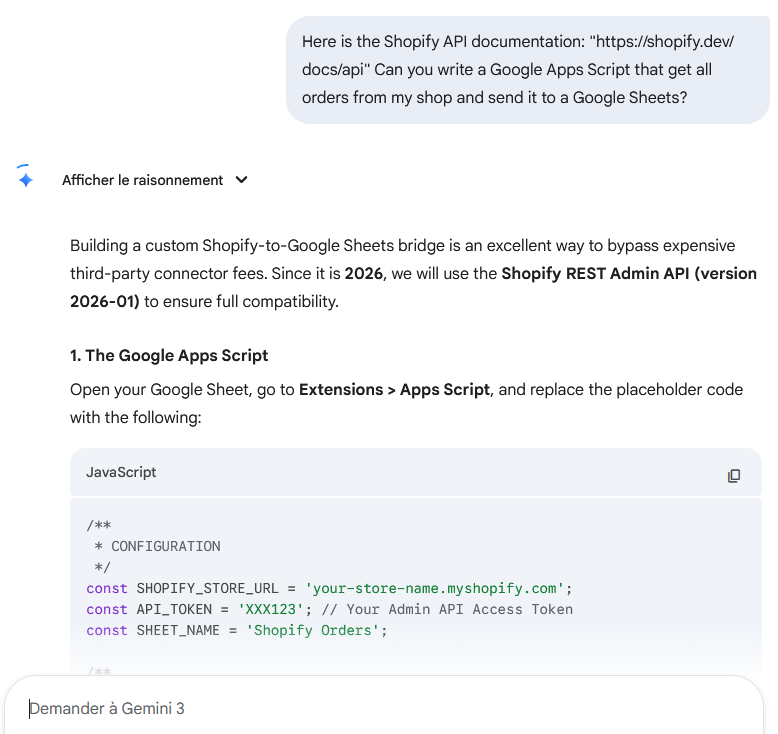
And that’s pretty much it! What are you to do next? Send the API documentation to the AI tool like Gemini, describe clearly what you are trying to achieve, and let the tool write the Google Apps Scripts for you. From there, a decent amount of time to adapt the code that the AI sent you (never works the first time, …the second time, … but on the 21st try, it usually does something!).
Once you’ve got the scripts built and working (make sure that you’ve limited the number of columns you’re returning, limited dates, …), put in a place a time-driven trigger so it runs once a day, and you’re good to go.
As said, there is work here. This is not a 5-minutes magic solution that will replace a $100 per month subscription. But if you are eager to spend time on it, have experience with AI prompting (everyone on LinkedIn is an expert these days…), for simpler requests, you may be able to make it work.
The only problem? If you end up working with a Google Sheets document of 10 tabs with 100.000 rows and 20 columns in each, Looker Studio may suffer from a performance perspective. Maybe using another Google Sheets where you aggregate data using the IMPORTRANGE function for example could save you here.
And that’s it! At the end of the day, it’s just time against money. In this article, we’ve discussed how to use Google Sheets & AI to build free connectors for Looker Studio dashboards.
PROBLEM SOLVED
Top Looker Studio connectors we love and use on a daily basis (all with free trials): PMA - Windsor - Supermetrics - Catchr - Funnel - Dataslayer. Reviews here and there.
Not sure which one to pick? Have a question? Need a pro to get a project done? Contact us on LinkedIn or by e-mail, and we’ll clear up any doubt you might have.
Looking for Looker Studio courses? We don’t have any… but you can check Udemy!
Communicate and browse privately. Check Proton Mail and Proton VPN
Website hosted by Tropical Server