
How to properly compare a metric against its monthly target in Looker Studio?
So you've got a monthly target, and you need to make a quick calculations to know how you're tracking, and this for everyday of the month? No worries, we've got you covered
This is a classic one where you struggle to get the formula right, but when you’ve got it, it’s for life ^^ In this article, we’ll quickly show you how to properly compare a metric against its monthly target in Looker Studio!
Top Looker Studio connectors we love and use on a daily basis (all with free trials): PMA - Windsor - Supermetrics - Catchr - Funnel - Dataslayer. Reviews here and there.
Not sure which one to pick? Have a question? Need a pro to get a project done? Contact us on LinkedIn or by e-mail, and we’ll clear up any doubt you might have.
Looking for Looker Studio courses? We don’t have any… but you can check Udemy!
Make sure you enable Month to date, and you’re good to go
Let’s assume you’ve got the Shopify net sales from a third party connector, and the monthly target revenue from a Google spreadsheet. In our example, we only have a single number per month, set to the first day of the month.
Your objective? Find out what’s the target yesterday/today (so you can compare against actual sales). That is to say, if we’re on day 14/30 of the month, are your net sales greater or lower than 14/30th of the target?
In order to achieve that, we’re going to cross blend Net Sales with our Target, making sure Date is set to This month to date:
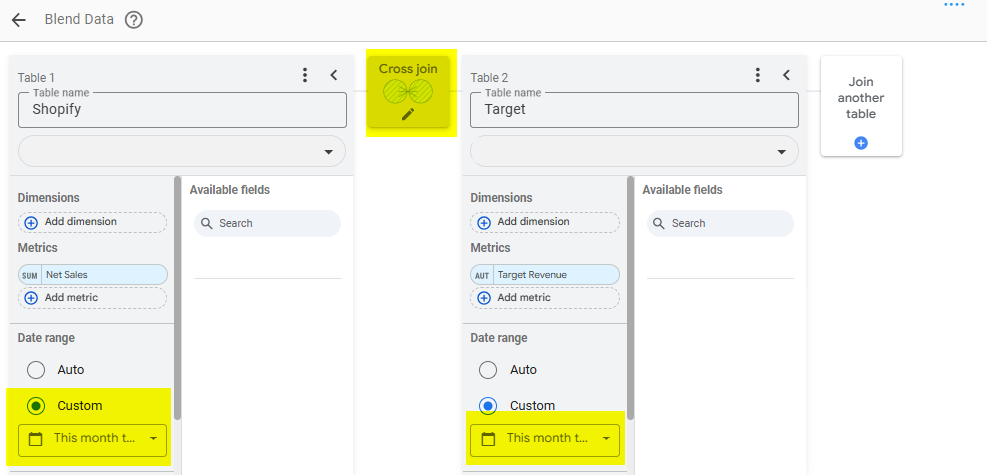
We now have a blended data source with Net Sales to date, and the full month target. But how can we get the target revenue to date? Using the following formula.
Modify the formula to match your particular requirements
Just to be clear: it is very likely you will have to update this formula a bit to match your use case, but here what does the job for us:
SUM(Target)
/
CAST(DAY(DATETIME_SUB(DATETIME_ADD(DATETIME_TRUNC(CURRENT_DATE(),MONTH), INTERVAL 1 Month), INTERVAL 1 DAY)) AS NUMBER)
*
CAST(DAY(CURRENT_DATE()) AS NUMBER)
So what do we do here:
First, we get the Target
Then, we divide it by the total number of days in the current month (either 30, or 31, sometimes 28, but not very often 29 ^^). The formula just do: take today, take first day of month, go to next month, remove one day, get the day number)
Eventually, we multiply this by the day of today (this one is easier)
So if you’re target for the month is $1000, you’re in a month of 31 days, and today’s the 14th, your running target for today is:
$1000 / 31 * 14 = ~$451
Assuming a linear progression, and a target of $1000 for the full month, you should hit ~$451 on the 14th to be on track to reach your target. From there, you can make a another quick calculated field to see the percent and/or actual variation.
Again, feel free to modify the formula if you need to remove today, or consider only weekdays and not weekends, … but that’s pretty much how you do to make a simple rule of 3 to go from monthly figures to to-date. You’re welcome :)
In this article, we’ve reviewed how to properly compare a metric against its monthly target in Looker Studio.
PROBLEM SOLVED
Top Looker Studio connectors we love and use on a daily basis (all with free trials): PMA - Windsor - Supermetrics - Catchr - Funnel - Dataslayer. Reviews here and there.
Not sure which one to pick? Have a question? Need a pro to get a project done? Contact us on LinkedIn or by e-mail, and we’ll clear up any doubt you might have.
Looking for Looker Studio courses? We don’t have any… but you can check Udemy!
Communicate and browse privately. Check Proton Mail and Proton VPN
Website hosted by Tropical Server