
How to group blended data by week or month in Looker Studio?
Looker Studio blended data can sometimes be annoying. But no worries, if you want to group by week or month, we’ve got a solution for you !
Lee la versión en español de este artículo aquí
Looker Studio / Data Studio can be really exasperating sometimes. In particular when it comes to blended data. Until their tech teams decide to apply a fix to this very common issue, we’ll review in this article how to group blended data by week or month in Looker Studio. Hope it helps!
Top Looker Studio connectors we love and use on a daily basis (all with free trials): PMA - Windsor - Supermetrics - Catchr - Funnel - Dataslayer. Reviews here and there.
Not sure which one to pick? Have a question? Need a pro to get a project done? Contact us on LinkedIn or by e-mail, and we’ll clear up any doubt you might have.
Looking for Looker Studio courses? We don’t have any… but you can check Udemy!
Currently, grouping dates in blended data tables by week or month does not work
In this example, we’ll be using a sample Google Ads data source blended on itself.
The important thing to consider here is that as a dimension in Table 1, we’re using the date (called Day in Google Ads, which can be confusing).
Now, what happens if we create a simple table, use this date as a dimension, and group by month. Well, it just doesn’t group:
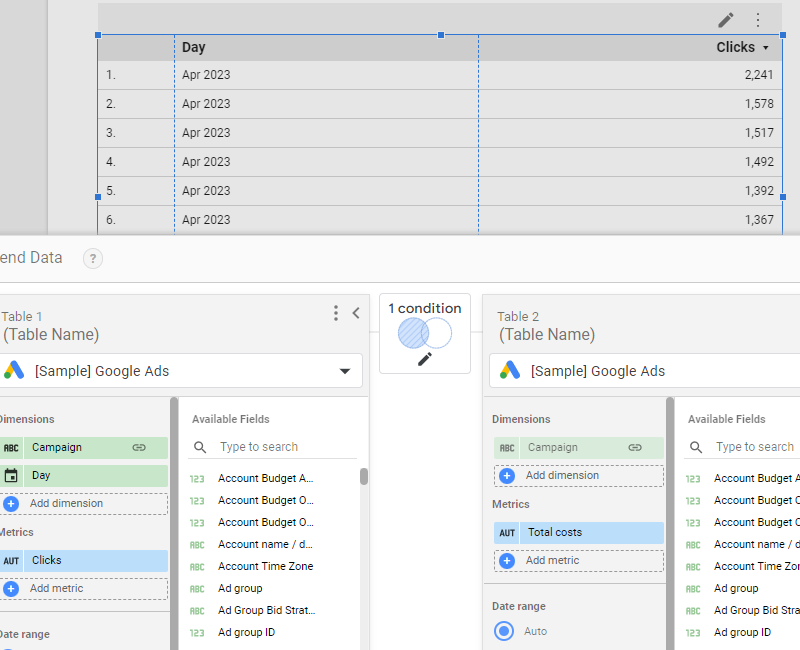
Data remains at the date level, and the month (here, April 2023) gets repeated on every single line. Same will apply to line charts, bar charts, …
How can this be fixed? Well, we’ll have to pre-aggregate in the Blended data directly.
Aggregating by week or month directly in the blended data
Please Edit your blended data, remove the date dimension, click Add dimension, and create a new one with the level of granularity you’re looking for. In our case, we’ll go for month, but same would apply to week, for instance writing something like:
MONTH(Day)
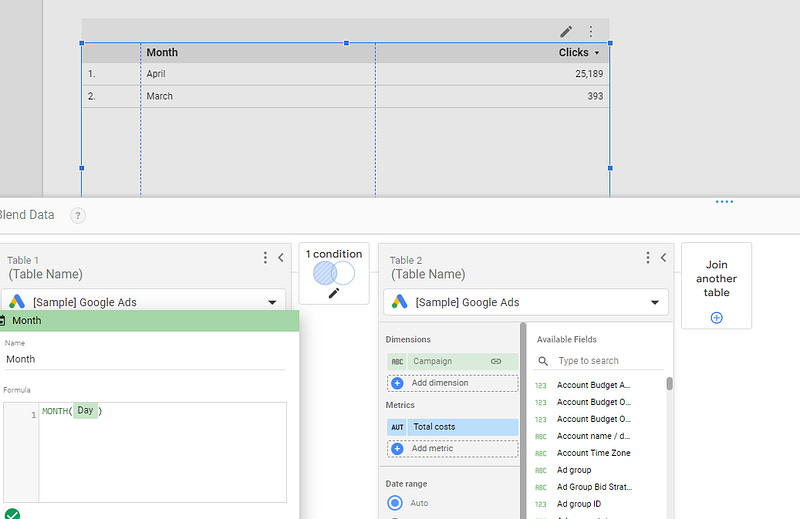
And that’s it, your data is now aggregated as you wanted it to!
Obviously, if you want to keep the year in as well, you might want to use the DATETIME_TRUNC() function instead. In our case, something along the line of:
DATETIME_TRUNC(Day,MONTH)
And you’ll get year / month level. Sharp.
In this article, we’ve reviewed how to use a calculated field to group blended data by week or month in Looker Studio.
PROBLEM SOLVED !
Top Looker Studio connectors we love and use on a daily basis (all with free trials): PMA - Windsor - Supermetrics - Catchr - Funnel - Dataslayer. Reviews here and there.
Not sure which one to pick? Have a question? Need a pro to get a project done? Contact us on LinkedIn or by e-mail, and we’ll clear up any doubt you might have.
Looking for Looker Studio courses? We don’t have any… but you can check Udemy!
Communicate and browse privately. Check Proton Mail and Proton VPN
Website hosted by Tropical Server