
How to fix pie chart with error: specified data cannot be rendered in Looker Studio
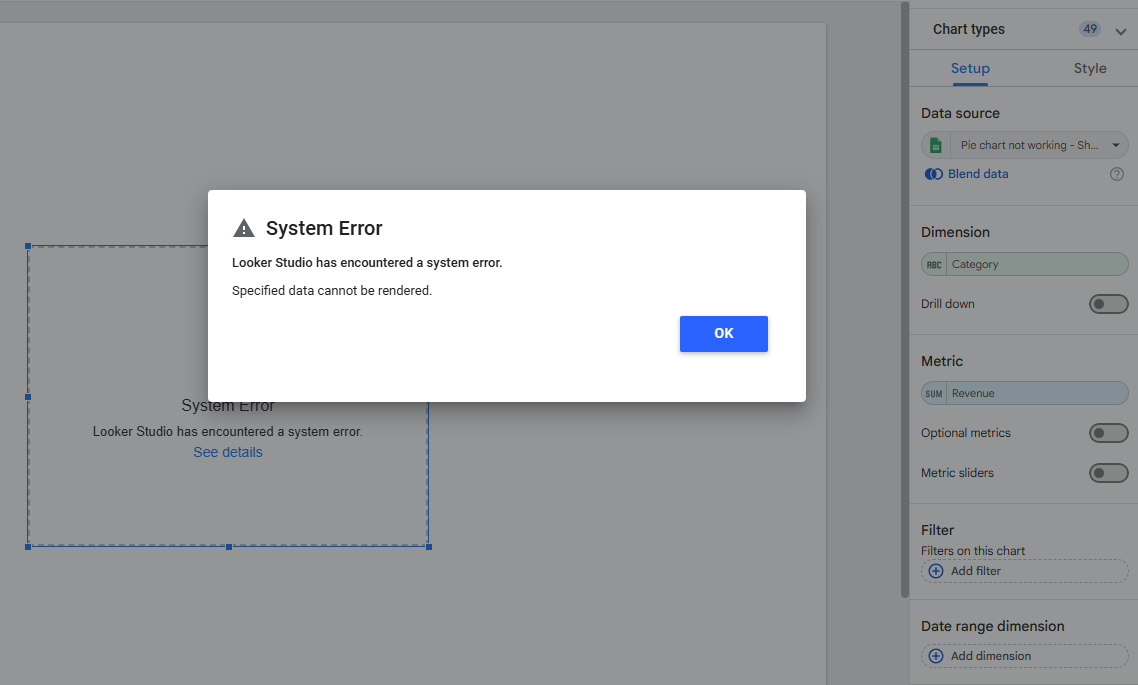
So, you're playing with a pie chart that sometimes works, sometimes does not? Specific data cannot be rendered? Classic one, it's because of negative values!
The question
I have a pie chart that shows revenue per category. Very standard. Still, when I show all categories it breaks, but if I filter on certain dates, categories and/or countries, it is ok. What is the issue?
The error message is: Looker Studio has encountered a system error? Specified data cannot be rendered
Top Looker Studio connectors we love and use on a daily basis (all with free trials): PMA - Windsor - Supermetrics - Catchr - Funnel - Dataslayer. Reviews here and there.
Not sure which one to pick? Have a question? Need a pro to get a project done? Contact us on LinkedIn or by e-mail, and we’ll clear up any doubt you might have.
Looking for Looker Studio courses? We don’t have any… but you can check Udemy!
The answer
Although you’re working with Revenue, you must have some Returns that are generating negative values in your data set. Thing is, pie chart don’t work with negative value. Pie chart sums values to display a 100% distribution:
2 categories selling $200 would show 2 equal parts of 50%
But if 2 categories were selling $200 and 1 category was -$100 because of returns, how would you display that?!
To be more precise, and as in your case you’re splitting by Category, it needs to always be positive or 0 at the category level: having a -$100 return row in your data won’t break the pie chart as long as you’ve got >$100 in revenue on other rows, and hence a total category that is >$0.
So, how to fix it?
No easy solution here unfortunately:
You can get all negative values out (by a filter, of with a formula like
CASE WHEN Revenue<0 THEN null ELSE Revenue END), but then reality is skewedYou can remove entirely the categories showing negative values with a blended data (again, skewing reality)
Alternative, you could consider using a bar chart or even a Waterfall: a bit different from a pie chart as you’re losing the 100% stacked view, but at least will always work, plus it will help you easily identify categories with negative revenue, kind of important isn’t it?
At the end of the day, the limitation is core to the way a pie chart works: it adds up value to 100%. Chime in negative, and reaching 100% becomes impossible!
PROBLEM SOMEWHAT SOLVED
Top Looker Studio connectors we love and use on a daily basis (all with free trials): PMA - Windsor - Supermetrics - Catchr - Funnel - Dataslayer. Reviews here and there.
Not sure which one to pick? Have a question? Need a pro to get a project done? Contact us on LinkedIn or by e-mail, and we’ll clear up any doubt you might have.
Looking for Looker Studio courses? We don’t have any… but you can check Udemy!
Communicate and browse privately. Check Proton Mail and Proton VPN
Website hosted by Tropical Server