
The question
Hi everyone,
I’m completely stuck due to a data set configuration error :

I don’t understand why, because in data management, this source is “Functional” and shows no errors. The Sheets file is clean, there are no duplicate headers, I have access to the file, etc. I tried to create multiple kinds of charts, with all available columns too…
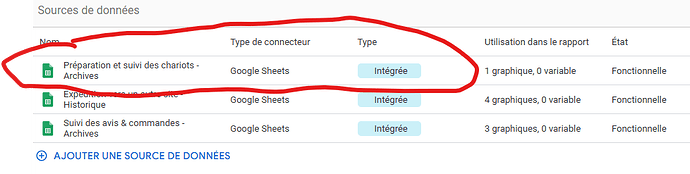
I’ve tried deleting and reconnecting several times, even using the URL, but the error always returns.
All other sources work for this report !
If anyone has an answer, I would be very grateful. Thank you.
Top Looker Studio connectors we love and use on a daily basis (all with free trials): PMA - Windsor - Supermetrics - Catchr - Funnel - Dataslayer. Reviews here and there.
Not sure which one to pick? Have a question? Need a pro to get a project done? Contact us on LinkedIn or by e-mail, and we’ll clear up any doubt you might have.
Looking for Looker Studio courses? We don’t have any… but you can check Udemy!
The answer
When it happens, it’s really annoying. You’ve checked the usual suspects:
Google Sheets data source connected, didn’t trigger any warning / error message
You’ve reconnected/refreshed your data source, no changes
You’ve got access to the source file and you’re using the right credentials
All columns labels are unique and with no funky character, there is no random data in the Sheet lost somewhere after column Z
Line 2 is not empty (this one is tricky if you don’t know about it, but yes, when creating a new Google Sheets data source, make sure all values have data in line 2 ie just below the header, so it captures the field types correctly, and then once connected feel free to have a few empty fields, but not the full row)
All fields types are as expected: text columns labelled as Text, value columns labelled as Number, date columns labelled as Dates, …
And it still doesn’t work?!
The most likely issue: corrupted data! In our example here, our user had a date column that was manually entered by team members. All worked smoothly, until someone entered 02/01/20226 instead of 02/01/2026. Thing is:
Google Sheets doesn’t raise ane issue
Looker Studio doesn’t raise any issue
But when building dataviz, it just breaks
It also could happen with text values in a Number field for instance (text fields are likely always OK, as they accept pretty much everything, even unconventional characters).
So, how do you catch this?
First method: set all your fields to text, reconnect, everything should work. Create a dummy dataviz, a table with a few fields. Then, one by one, change your field types back to their original state (Number, Date, Boolean), refresh, and check when the dataviz breaks. You’ll know the culprit
Another option, in the Google Sheets source file directly, make a new column, where you input the formula =C2+1 (if your value column is column C) and paste below. Then, scan this column to see if it breaks somewhere. If it does, it means that in this given row, you don’t have a number but a text. Fix it, reconnect/refresh the data source, and it should work again
Similarly for dates, try a data formula and scan to check which cells give an error or an unexpected result like Year = 20226: it will not break in Google Sheets, but it will in Looker Studio!
And for the future, think of using data validation in Google Sheets to force everyone to input the right format in the right cell!
PROBLEM SOLVED
Top Looker Studio connectors we love and use on a daily basis (all with free trials): PMA - Windsor - Supermetrics - Catchr - Funnel - Dataslayer. Reviews here and there.
Not sure which one to pick? Have a question? Need a pro to get a project done? Contact us on LinkedIn or by e-mail, and we’ll clear up any doubt you might have.
Looking for Looker Studio courses? We don’t have any… but you can check Udemy!
Communicate and browse privately. Check Proton Mail and Proton VPN
Website hosted by Tropical Server