
How to connect LinkedIn Ads to Looker Studio
Want to better understand how your LinkedIn Ads are performing, but the native Business Manager isn't really helping? No worries, we've got you covered!
Lee la versión en español de este artículo aquí
In this article, we’ll show you how to connect LinkedIn Ads to Looker Studio. From there, you’ll be able to build meaningful data visualizations (or re-use existing templates) to better understand how you’re performing, what’s working well, what’s not, and how to improve to get your business to the next level!
Top Looker Studio connectors we love and use on a daily basis (all with free trials): PMA - Windsor - Supermetrics - Catchr - Funnel - Dataslayer. Reviews here and there.
Not sure which one to pick? Have a question? Need a pro to get a project done? Contact us on LinkedIn or by e-mail, and we’ll clear up any doubt you might have.
Looking for Looker Studio courses? We don’t have any… but you can check Udemy!
You could use the LinkedIn API, but we don’t recommend that!
So, when first looking at the problem, you might consider using the LinkedIn API. They’ve got a nice documentation for sure, but it’ll require some serious technical skills just to retrieve the data (and make sure to add functions to catch errors and re-run when there is an issue, believe us, it happens more often than not with this API in particular ^^). But then, every time that LinkedIn makes an update to its API, you’ll need to maintain what you’ve built to ensure it keeps working.
If you’ve got a big company with serious developers / data engineers that can dedicate some of their time to this task, then go for it. You’ll be in total control, but from time to time you’ll need to take them away from their daily tasks to “have a quick look”, sometimes a good day of work!
Use a direct to Looker Studio third-party connector, and focus on building the report of your dreams (or easier, steal templates!)
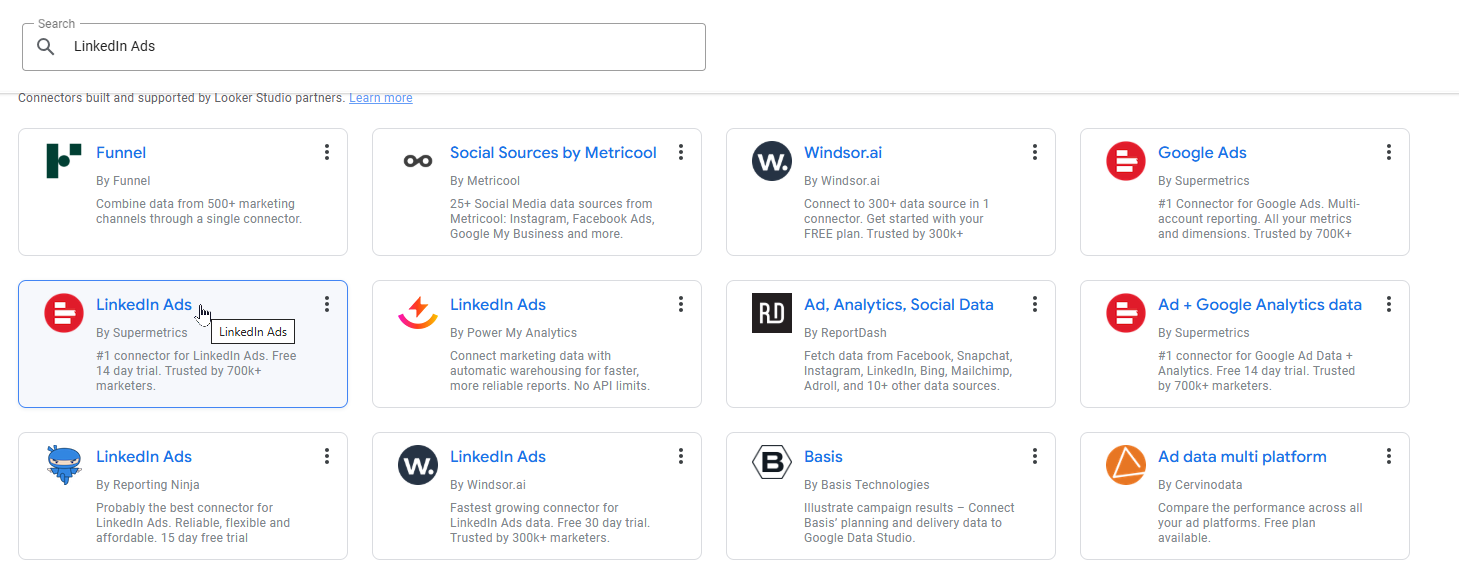
You cannot send LinkedIn Ads data directly to Looker Studio, but there are several good options (at different price points) to take care of the heavy lifting for you.
What data will I be able to play with? Most connectors handle the LinkedIn Ads data in a very similar way, so most if not all offer the same dimensions and metrics. Take advantage of the usual 14 days free trial to run your own benchmark, but you should have access to:
Generic information about your account (like name, ID, currency)
Data on campaigns (start and end date, budget, status, type, …), leadgen emails (sends, opens, clicks, leads, …) campaign groups and ads (costs, impressions, clicks, link clicks, conversions, leads, …)
And for most of these, you’ll have access to splits by geographic, job titles, functions, company sizes, …
Now, and assuming you only want to connect LinkedIn Ads and only have one account, find below our favorite options (check our reviews here and there if you need to connect more accounts / more data sources, as each of these comes with a different price structure):
Catchr: A good (and French!) solution that offers a friendly priced single-connector plan with 10 accounts at $20/month (always showing annual contract pricing here for a fair comparison)
Dataslayer: starting at 29€/month , this connector offers you all of the metrics listed above in a nice dark interface, and up to 3 data sources / 3 accounts at this price point
Supermetrics: solid option at the same price of 29€/month with the same 3 data sources / 3 accounts, but with weekly refreshes
Windsor: A cheaper option for up to 3 data sources / 75 accounts at $19/m, that comes with daily refreshes
Power My Analytics: They removed their most basic plan, so now price starts at 41.63$/month, but for this price you already have 5 data sources / 5 accounts, so good if you already know you’ll pimp your Looker Studio ride in the coming weeks
Funnel: most powerful option, as you can pre-blend your LinkedIn Ads data with other data sources directly in the tool and only use one Looker Studio connector to display all. But comes with a higher price points, hard to tell upfront before knowing how many data sources / accounts you’ll use unfortunately…
As mentioned previously, they all come with a 14 days free trial, so we advise to test 2 / 3 of them that you like, don’t forget to compare pre-built templates that could save you some time, and eventually pick the winner!
In this article, we’ve reviewed how to connect LinkedIn Ads to Looker Studio.
PROBLEM SOLVED
Top Looker Studio connectors we love and use on a daily basis (all with free trials): PMA - Windsor - Supermetrics - Catchr - Funnel - Dataslayer. Reviews here and there.
Not sure which one to pick? Have a question? Need a pro to get a project done? Contact us on LinkedIn or by e-mail, and we’ll clear up any doubt you might have.
Looking for Looker Studio courses? We don’t have any… but you can check Udemy!
Communicate and browse privately. Check Proton Mail and Proton VPN
Website hosted by Tropical Server