
How to add comments to your reports using newly released shapes in Looker Studio?
Want to add comments to your reports but are tired of yet another text box? Well, we'll keep using text boxes... but on top of newly released callout, it does look good!
Comments are keys on dashboards (shall it be on Looker Studio or on any other reporting tools), and text boxes are very useful for that. But is there a way to make them look better integrated to your reports? Now, there is! In this article, we’ll review how to add comments to your reports using newly released shapes in Looker Studio.
Top Looker Studio connectors we love and use on a daily basis (all with free trials): PMA - Windsor - Supermetrics - Catchr - Funnel - Dataslayer. Reviews here and there.
Not sure which one to pick? Have a question? Need a pro to get a project done? Contact us on LinkedIn or by e-mail, and we’ll clear up any doubt you might have.
Looking for Looker Studio courses? We don’t have any… but you can check Udemy!
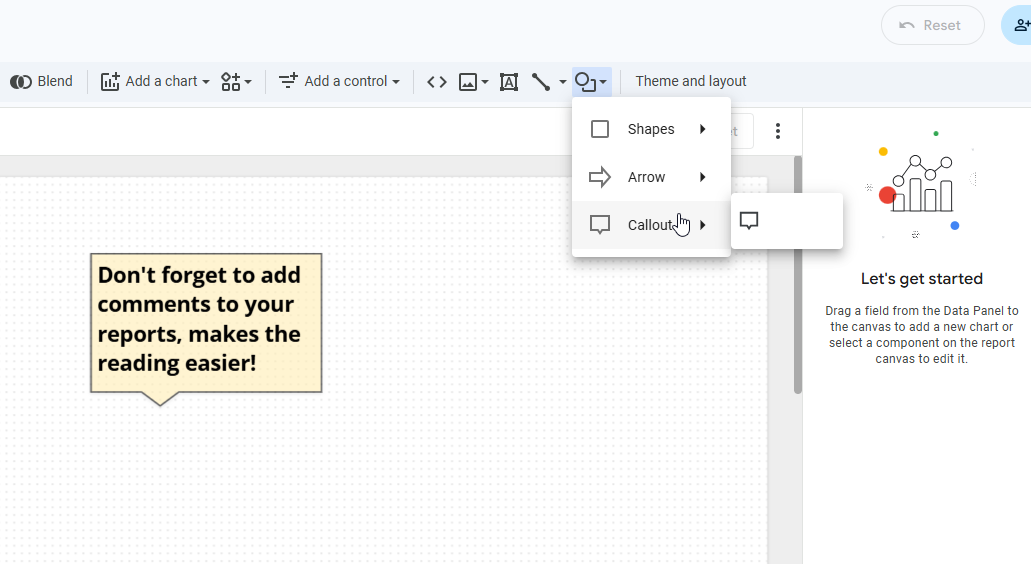
Add a callout shape, add a text box on top, and you’re good to go!
Google keeps on adding features to Looker Studio, and this one, as small as it might seem, is actually really nice.
Indeed, they’ve expanded the list of Shapes you can add to your report, now you can choose between: rectangle, circle, triangle, arrows, heart, diamond, start, pentagon, hexagon, octagon, cylinder, and the one we’re interested in today: callout!
So, what do we do here? In Edit mode, top of your screen, Add a Shape (circle and square icon next to the line), and then Add a callout. Make it yellow so it mimics the post-it color, with clear black border, and add a bit of transparency.
Once done, Add a text box, write your comment, and just place it on top of your callout: you’ve virtually added a post-it to your report, looks nice right?
And that’s it for today folks. Not a big data thing, but sometimes, great attention to details can have an impact. And that’s why everyone puts it on its CV ^^
In this article, we’ve reviewed how to add comments to your reports using newly released shapes in Looker Studio.
PROBLEM SOLVED
Top Looker Studio connectors we love and use on a daily basis (all with free trials): PMA - Windsor - Supermetrics - Catchr - Funnel - Dataslayer. Reviews here and there.
Not sure which one to pick? Have a question? Need a pro to get a project done? Contact us on LinkedIn or by e-mail, and we’ll clear up any doubt you might have.
Looking for Looker Studio courses? We don’t have any… but you can check Udemy!
Communicate and browse privately. Check Proton Mail and Proton VPN
Website hosted by Tropical Server