
Check-list to fix blended data errors (missing, incorrect values, ...) in Looker Studio
You're pretty sure you've done everything correctly and still, the blended data does not return what you expected to see... No worries, we've got you covered!
Blending data in Looker Studio is more than a technical feature, it’s an art. And if you remember your art classes at school, far from everyone is an artist! But no worries, we’re here to help. If you’re facing incorrect results with one of your blended data, pretty sure that the issue is coming from one of the smoking guns listed below. And if not, you can always contact us, it’d be a pleasure to solve your problem. With no further delay, the infamous check-list to fix blended data errors (missing, incorrect values, …) in Looker Studio!
Top Looker Studio connectors we love and use on a daily basis (all with free trials): PMA - Windsor - Supermetrics - Catchr - Funnel - Dataslayer. Reviews here and there.
Not sure which one to pick? Have a question? Need a pro to get a project done? Contact us on LinkedIn or by e-mail, and we’ll clear up any doubt you might have.
Looking for Looker Studio courses? We don’t have any… but you can check Udemy!
The classic errors: incorrect joins and null values
When you set-up your blended data, most people use either LEFT or INNER joins (some experts need the FULL OUTER or the CROSS join, but we’ve seen very few use cases for the RIGHT join), and then write formulas like they do for traditional data sources. So, if you’re not seeing what you’re expecting to see:
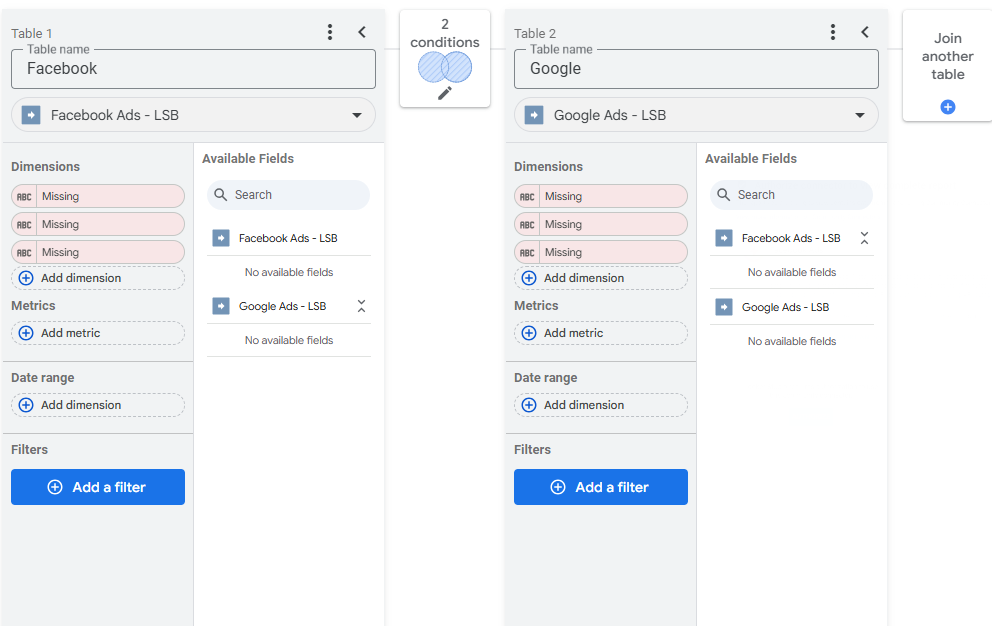
Check the join: When doing INNER, you filter out all dimensions that are not present in both tables. Maybe a LEFT join would fix this. On the other end, sometimes a LEFT join is not enough as it filters out everything that’s not on the first table, so considering a FULL OUTER join could be a solution here
Check the Merge conditions: Are you generating duplicates? Maybe you’ve forgotten to add a dimension. As a rule of thumb, all dimensions present in both tables should be used in the merge conditions, unless you know that these are “static” fields that won’t generate duplicate rows
Check the formulas: your Google Spends + Meta Spends does not return the right number? Blended data is not very good at handling null values, so replacing your formulas with IFNULL(Google Spends,0) + IFNULL(Meta Spends,0) could solve the issue. Similarly, always prefer formulas with operators in them, ie SUM(IFNULL(Costs,0)) / SUM(IFNULL(Revenue,0)) Vs IFNULL(Costs,0) / IFNULL(Revenue,0), solves many issues
The less common errors: date range, filters and aggregates
Check date range: Are you using the right field for date range? On both tables? And are these set to Auto, or to Custom? Always worth a check here…
Check filters: You cannot apply an existing data source filter to a blended data dataviz. The filter must be applied WITHIN the blend, at the bottom of each table
Check the aggregates: By default most metrics are set to SUM, but in some cases, it’ll generate duplicates. Changing the aggreagates to AVG can sometimes save you
The hard to see errors: date formats, field formats
Check the date type / date format: when joining on dates, both fields must be of the same data type: DATE to DATE, DATETIME to DATETIME, … Sometimes it’s not the case and it breaks, without telling you where the issue comes from, so another thing to double-check
Check that all fields format are as expected: you’ve got a column set to numbers, but somewhere in your data source, you’ve got a string in this field. Again, Looker Studio won’t prompt that it’s receiving incorrect data whilst breaking, but you can check that by starting from a blank table, and adding fields one by one. If adding a particular field generates an error, you’ve got a good candidate to investigate
And that’s it for today. Have you seen other type of errors not listed above? Or these are not solving your problem? Let us know! In this article, we’ve presented a quick check-list to fix blended data errors (missing, incorrect values, …) in Looker Studio.
PROBLEM SOLVED
Top Looker Studio connectors we love and use on a daily basis (all with free trials): PMA - Windsor - Supermetrics - Catchr - Funnel - Dataslayer. Reviews here and there.
Not sure which one to pick? Have a question? Need a pro to get a project done? Contact us on LinkedIn or by e-mail, and we’ll clear up any doubt you might have.
Looking for Looker Studio courses? We don’t have any… but you can check Udemy!
Communicate and browse privately. Check Proton Mail and Proton VPN
Website hosted by Tropical Server